A quick CPU glance
 143%9:41 AM
With the menu bar options on, Mira and CPU usage appear on the right side. The percentage is sample data.
 QuietCPU
QUIETCPU / INSTALL GUIDE
Four small steps to install the free Mac app. Then see what the companion and CPU monitor look like when QuietCPU is running.
No account or purchase needed to start monitoring.
THE INSTALLATION
The first three pictures are illustrations of the steps; macOS windows may look a little different on your Mac.
Choose Download for Mac. Your browser saves QuietCPU-1.5.24-signed.pkg, usually in Downloads.
PKGQuietCPU-1.5.24-signed.pkgDouble-click the downloaded .pkg. Follow the macOS Installer prompts and enter your Mac password if asked. QuietCPU is installed in Applications.
QuietCPUA little company for your MacAfter installation finishes, open Applications → QuietCPU. The app lives on your Mac; you do not need to keep the downloaded .pkg to run it.
QuietCPUThe welcome screen introduces the free CPU monitor. Select Get started, then choose whether QuietCPU should open when you log in. That option can be changed later in Settings.
Mira and Luna are included free. You can use the CPU monitor without buying a character pack.

AFTER INSTALLATION
The QuietCPU icon, companion and monitor are app captures with sample data. The clean desktop around them is an illustration so no personal files or windows are shown. Appearance may vary by app version and settings.
143%9:41 AMWith the menu bar options on, Mira and CPU usage appear on the right side. The percentage is sample data.
143%9:41 AM
Mira floats on your desktop and changes pose as CPU load changes. Click the companion to open the monitor.
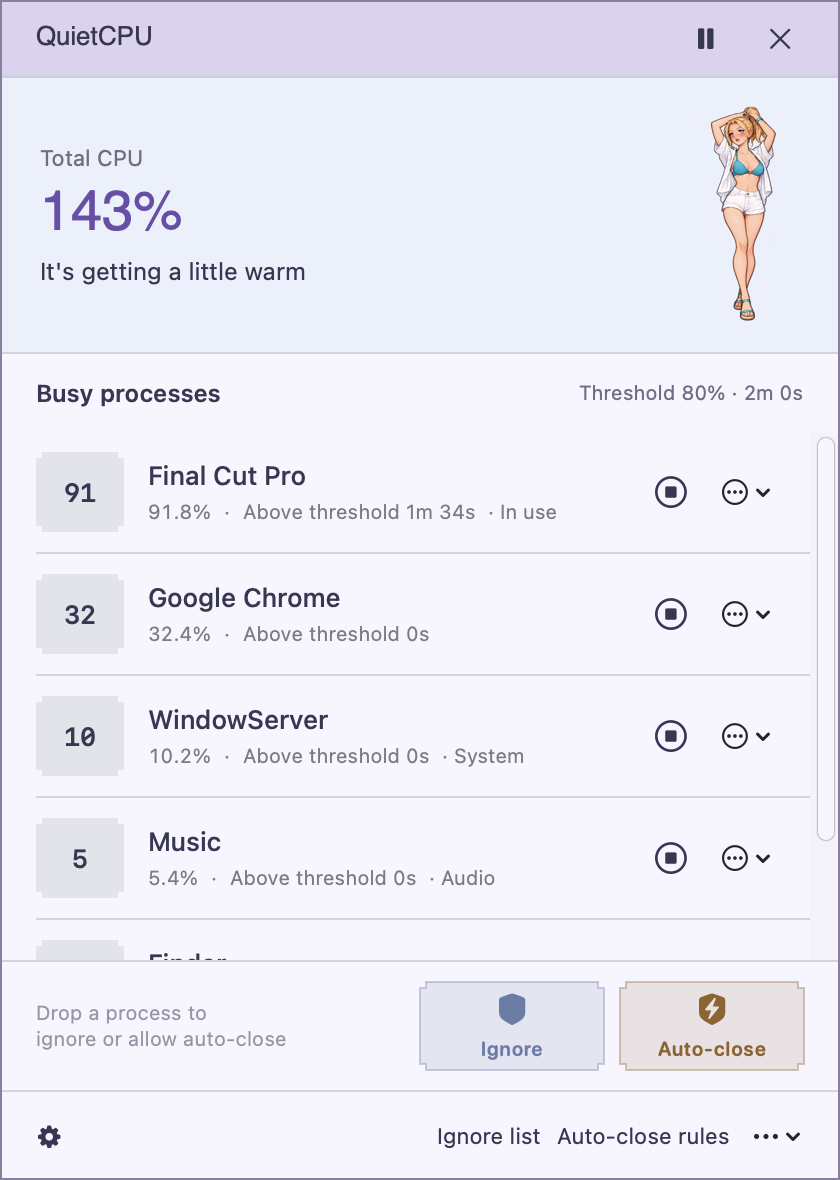
See total CPU use and busy processes. QuietCPU asks before closing a process; automatic closing follows only rules you choose.
READY WHEN YOU ARE
macOS 13 or later · Intel and Apple silicon · No account or purchase required